Kibana
Kibana
1. Kibana
- UI for visualizing Elasticsearch data.
- Supports:
- Discover (raw data view)
- Dashboards
- Visualizations
- Alerts & Watchers
- Reports
- Role-based access control
- End-users (HR, Finance etc.) get only Kibana access, never Elasticsearch/Logstash access.
1.1 Access Control Example
- HR team sees only HR data.
- Finance team sees only finance data.
- A user belonging to both sees both.
- Managed through roles & user permissions in Kibana.
2. Kibana ↔ Elasticsearch Connection Requirements
To connect Kibana to Elasticsearch, the following are required:
✔ Elasticsearch URL
Example:
http://localhost:9200
✔ Kibana System user
Default inbuilt user → kibana_system
✔ Password for kibana_system
- Needs to be reset manually because Elastic does not give a default password.
3. Important Inbuilt Elasticsearch Users
These are created automatically during first installation:
| User | Purpose |
|---|---|
| elastic | Super user (admin) |
| kibana_system | Used by Kibana to connect to Elasticsearch |
| logstash_system | Used by Logstash |
| apm_system | Used by APM server |
| beats_system | Used by Filebeat, Metricbeat, etc. |
⚠ Do NOT share elastic user password with anyone.
4. Resetting Passwords
Command (run inside Elasticsearch bin/ folder):
1
elasticsearch-reset-password -u <username>
Notes
- Elasticsearch must be running before using reset-password.
- Passwords are stored inside path.data, but not visible (only replace by resetting).
- If user does not exist → error (e.g., trying to reset a user you haven’t created).
5. Kibana Installation & Configuration
After downloading Kibana:
5.1 Important file
config/kibana.yml
Key settings to configure:
1
2
3
4
5
6
server.port: 5601
server.host: "localhost"

elasticsearch.hosts: ["http://localhost:9200"]
elasticsearch.username: "kibana_system"
elasticsearch.password: "<your_password>"
5.2 SSL Certificate Settings
- Elasticsearch uses certificates for secure communication.
- Certificate file:
Located at:
Elasticsearch/config/cert/http_ca.crt
When certificate is required:
- If Kibana runs on a different machine than Elasticsearch.
When NOT required:
- When both run on same machine (localhost).
To ignore certificate verification:
1
elasticsearch.ssl.verificationMode: none
6. Starting Kibana
Go to Kibana bin folder:
1
kibana.bat
Notes:
- First launch takes 4–5 minutes.
- Warnings can appear; errors must be fixed.
Once running → access via:
http://localhost:5601
7. Kibana UI Overview
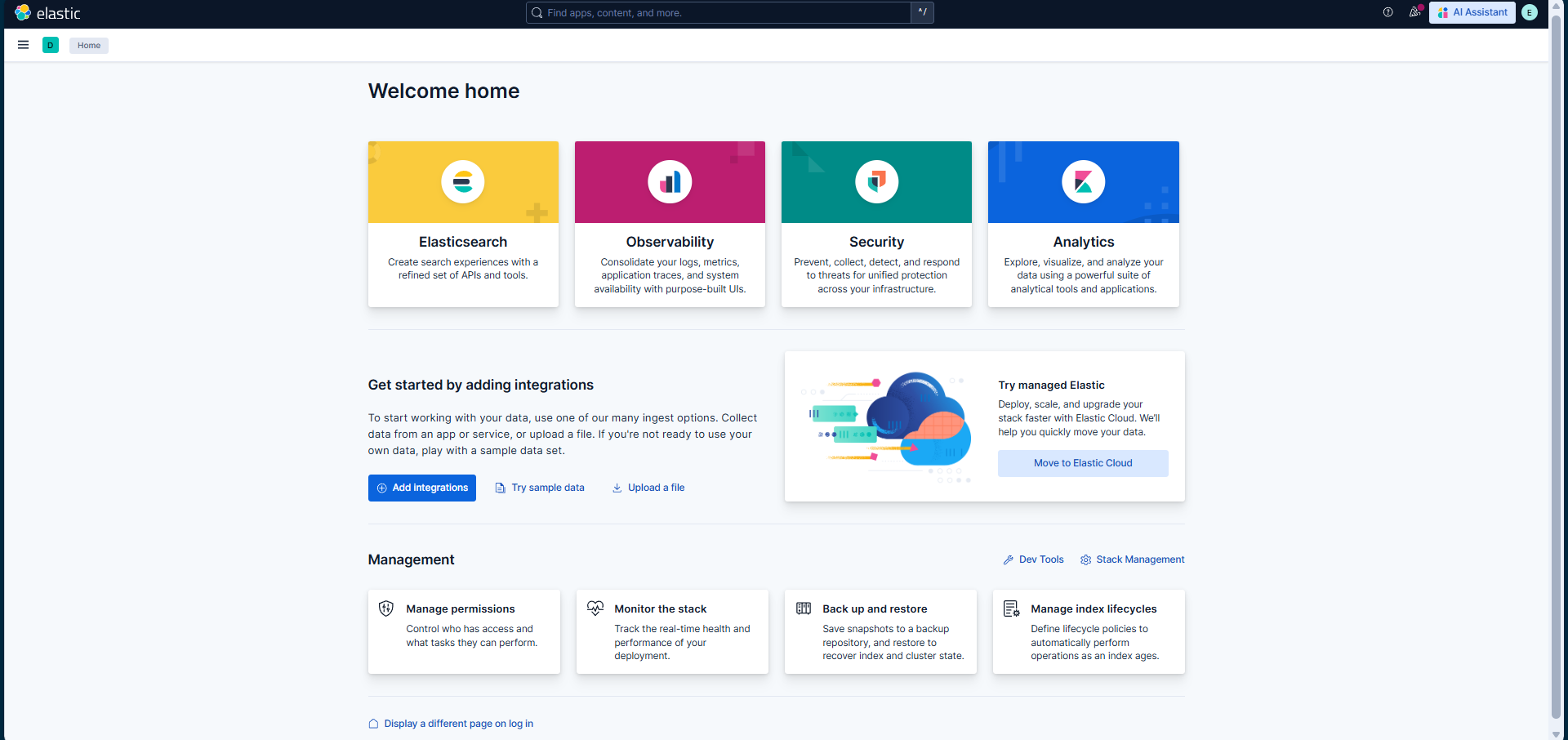
Left Sidebar Tabs:
7.1 Analytics
- Discover → View raw indexed data.
- Dashboard → Grouped visualizations.
- Visualize Library → Create/edit charts.
- Machine Learning → Anomaly detection (requires paid license).
7.2 Observability
- Logs / Metrics / Traces
- View application behavior, performance, error rates.
7.3 Security
- Security events, host events, network monitoring.
- Alerts, rules, cases.
7.4 Dev Tools
- Run Elasticsearch queries (DSL).
- Very useful for debugging.
7.5 Stack Management
Important admin section:
- Users & Roles
- Index Management
- Index Lifecycle Policies (ILM) → retention rules
- Snapshot & Restore → backups
- Ingest Pipelines → basic data processing
- Connectors → email, Slack, Teams alerts
- Stack Monitoring → monitor Elasticsearch/Kibana/Beats health
8. User, Role & Password Management
Create user:
- Stack Management → Users → Create User
- Provide:
- Username
- Password
- Roles
- Save
Change password:
- You cannot view existing password.
- You can only change it (enter current + new password).
9. Indexing Concepts
Index = Equivalent of “table” in SQL
Document = Equivalent of “row”
Fields = Equivalent of “columns”
ILM (Index Lifecycle Management)
- Controls how long data stays in Elasticsearch.
- Example: keep logs 7 days → delete after that.
10. Integrations
Elasticsearch provides 300+ predefined integrations:
- AWS EC2
- MySQL / Oracle databases
- Beats
- Kubernetes
- Cloud
- Application logs
- Network devices
Helps ingest data easily without writing custom code.
11. Production Considerations
Restart Approval Rules
- Kibana/Elasticsearch restarts should only be done:
- During maintenance window
- Usually 12 AM – 5 AM weekends
- Required to avoid impacting end-users.
Dev > Test > Prod flow
- Do all config changes in DEV first.
- Verify no errors.
- Follow organization’s Change Request (CR) process before PROD deployment.
This post is licensed under CC BY 4.0 by the author.